Virtual fitting room for ecommerce
Your catalogue, worn by your shoppers.


2Choose an item


Try it with your own photo in the demo store.shop.aisthetix.com
Shoppers upload a photo and see a catalogue item on themselves, without leaving the product page. You measure what happens after the try-on: carts and purchases.
Free plan: 10 try-ons a month, no credit card.WooCommerce and Nuvemshop
The try-on opens on the product page.
The shopper taps the button, uploads a photo and sees the result. It all happens on the product page they were browsing.
1No codeInstall the app and activate the try-on on your product pages.
2Stay on the pageShoppers stay on the product page to try the item on.
3On phones, tooThe try-on works on mobile. Shoppers upload a photo from their device.
415 to 30 secondsThe typical time to see a result.

Illustrative schematic, not a screenshot of a real store.
Install without code.
Shopify is the primary platform. WooCommerce and Nuvemshop are supported, with dedicated instructions.
- Install the appFrom the Shopify App Store, starting with the Free plan.
- Activate try-onEnable it for your store, without editing theme code.
- You are liveThe button appears on product pages, ready for shoppers to use.
Shopify
PrimaryInstall from the Shopify App Store.
InstallWooCommerce
Install the plugin from WordPress.org.
InstallNuvemshop
Open the dedicated Nuvemshop integration.
Open integration
Availability and terms may vary between platforms.
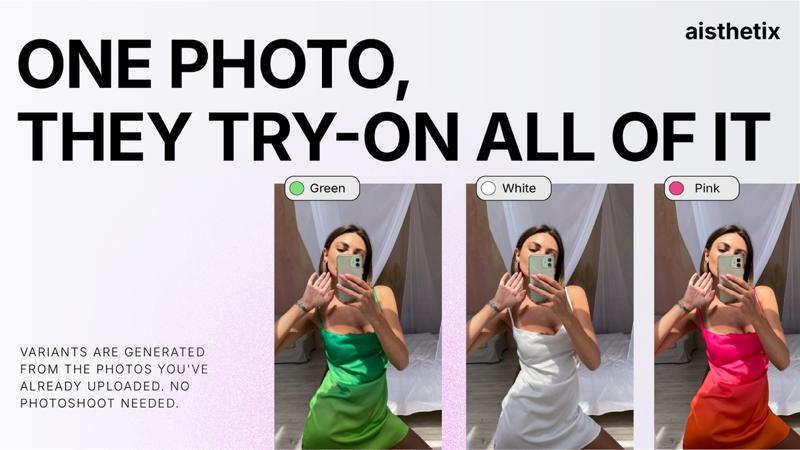
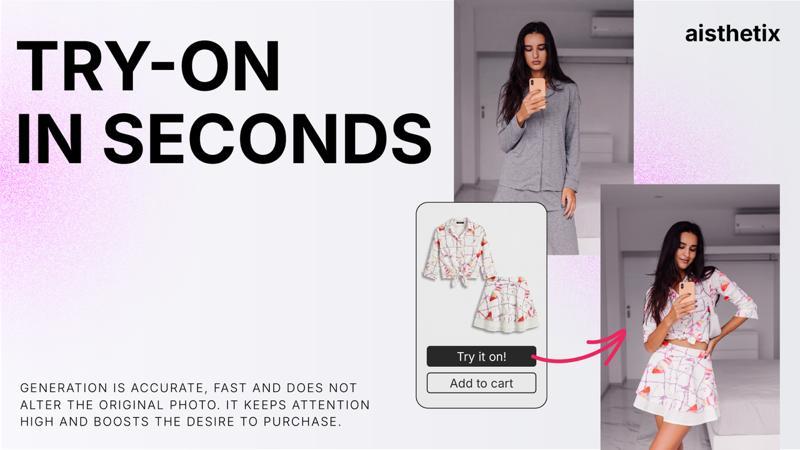
Images from the aisthetix Shopify App Store listing, shown as a style reference.
See what happens after the try-on.
The dashboard compares shoppers who used try-on with those who viewed the same product without it. It shows what happened, without predictions.
What we measure
- Product viewed
- Try-on used
- Added to cart
- Purchased
Comparison rules
- Events are recorded only with the required consent.
- The comparison stays hidden until each group has at least 10 distinct shoppers.
- The comparison group must also have a conversion rate above zero.
- Analysis and attribution window: 30 days.
Conversion by group
How the comparison appears in the dashboard.
3.1x
The ratio between the two rates in this example.
Correlation, not proof of cause.
Illustrative figures. These are not real customer results.
Example of a hidden comparison. If either group has fewer than 10 distinct shoppers, or the comparison group has zero conversions, the ratio does not appear.
Four plans. Start with Free.
Prices in USD, billed every 30 days. Start on Free without a credit card.
| Plan | Price | Included try-ons | Extra try-on | Notes |
|---|---|---|---|---|
| Free | $0 | 10 per month | Not available | No credit card. Stops at the included limit. |
| Starter | $24.99 / month | 150 per month | $0.18 per try-on | 30-day trial, up to 50 try-ons. |
| Growth | $49.99 / month | 300 per month | $0.14 per try-on | 30-day trial, up to 50 try-ons. |
| Business | $149.99 / month | 1000 per month | $0.10 per try-on | 30-day trial, up to 50 try-ons. |
- Paid plans include a 30-day trial, up to 50 try-ons.
- Free stops at its 10 included monthly try-ons.
- Billed in USD every 30 days. Try-ons beyond the included quota are billed at the rate shown, and only up to a monthly cap you approve when you subscribe, so you are never charged more than you agreed to. WooCommerce pricing at launch.
The shopper photo.
- During try-onProcessing starts only after the shopper’s explicit action and required consent. The photo is used to generate the result.
- After processingThe aisthetix service does not retain the uploaded photo.
- In the browserThe avatar image may remain in local browser storage on the shopper’s device.
- AnalyticsTry-on, cart and purchase events are recorded only with the required consent.
Frequently asked questions.
More questions? Email davide_mastricci@aisthetix.com.
What is AI virtual try-on software?
AI virtual try-on software lets shoppers upload a photo and see themselves wearing an ecommerce product before purchase. aisthetix adds this virtual fitting room to Shopify, WooCommerce and Nuvemshop product pages and gives merchants product-level effectiveness analytics.
How does the Shopify virtual try-on app install?
aisthetix is a Shopify app embed: you install it from the Shopify App Store and it adds directly to your active theme. No code changes, no developer needed.
Do you support WooCommerce?
Yes. aisthetix Try-On is published for WooCommerce on WordPress.org, alongside the Shopify app. Nuvemshop is also supported through its dedicated integration. Availability and terms may differ between platforms.
How is the 'N× lift' calculated, and when is there enough data?
We compare shoppers who tried on the same product with those who viewed it without trying on. Lift appears only after at least 10 distinct shoppers in each group and a non-zero comparison conversion rate. The analysis and attribution window is 30 days; it shows correlation, not proof of causation.
What data do you track?
We track four product-level pixel events: product viewed, try-on used, added to cart, and purchased, plus the try-on interaction itself. All tracking is consent-gated. We do not track dwell time, per-colour choices, or per-variant selections.
Are shopper photos stored?
Try-on starts only after the shopper’s explicit action and required consent. The aisthetix service does not retain the uploaded photo after processing, but the shopper’s avatar image may remain in that shopper’s own browser storage. Analytics runs only where the required consent is granted.
How fast is a try-on?
About 15-30 seconds from tap to result.
How do limits and billing work?
The Free plan stops after its 10 monthly try-ons. Paid plans include a 30-day trial capped at 50 try-ons; after the included quota, extra try-ons use the approved plan rate and monthly cap.
Does the shopper leave the product page?
No. Try-on opens on the product page, where the shopper uploads a photo and sees the result.
Does it work on phones?
Yes. Shoppers can upload a photo from their phone and use the try-on on mobile product pages.
Do I need a credit card to start?
No. The Free plan includes 10 try-ons a month without a credit card.
Try aisthetix on your store.
Black Blazer 
Knit Midi Dress 
Leather Jacket 
Emerald Gown